When your account is first created by your agency administrator you will receive an email prompting you to register for your account. This article will walk you through the few simple steps to log into Frisco for the first time!
Registration Email
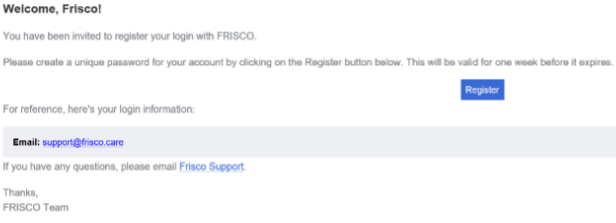
The registration email you receive will have a button that says "Register" as pictured in the screenshot below. Click that link and it will take you to a log in screen where you will be prompted to create your password.
Password Creation
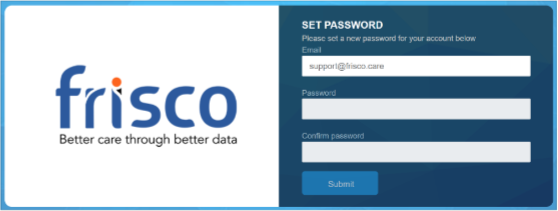
In order to set your password, enter your desired password twice and press "Submit" and you will then be prompted to log in to Frisco for the first time. Passwords must meet the following minimum requirements:
- Be at least 8 characters in length
- Contain at least 1 uppercase
- Contain at least 1 lowercase
- Contain at least 1 number
- Contain at least 1 special character
Was this article helpful?
That’s Great!
Thank you for your feedback
Sorry! We couldn't be helpful
Thank you for your feedback
Feedback sent
We appreciate your effort and will try to fix the article